Every child deserves
understanding, care,
and a chance to grow
beyond their challenges.
01 OVERVIEW
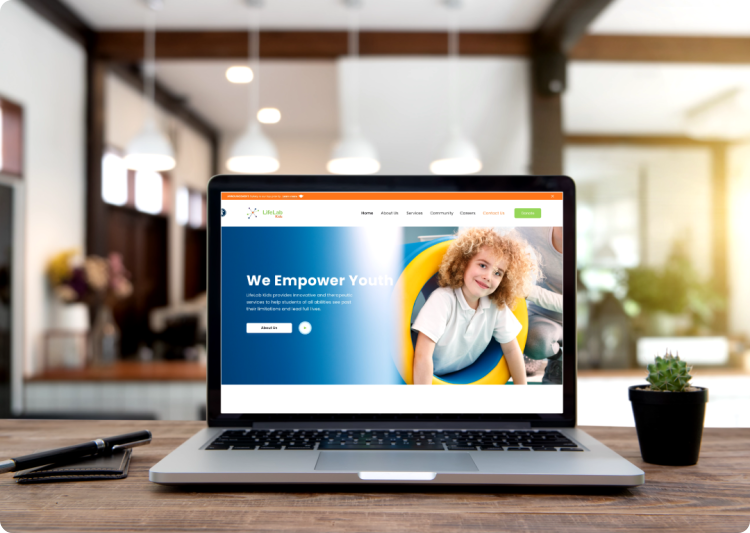
LifeLab Kids is a nonprofit organisation that supports children (including those with autism, ADHD, and developmental differences) through a holistic, therapy-based approach.
02 ROLE
Lead UX
Working as the Lead Designer for LifeLab Kids felt truly special to me, as it supports children with autism, ADHD, and developmental differences. I focused on creating a simple, empathetic experience that helps parents and caregivers easily access the right resources and support.

Problem Discovery
- No centralized digital platform to communicate the organization's mission
- Limited visibility and awareness of the initiative among users
- Lack of easy access to educational resources and information
- Users struggle to understand the impact of the organization's work
- No seamless or intuitive donation experience
- Overall impact and scalability of the organization are constrained
02 PROCESS
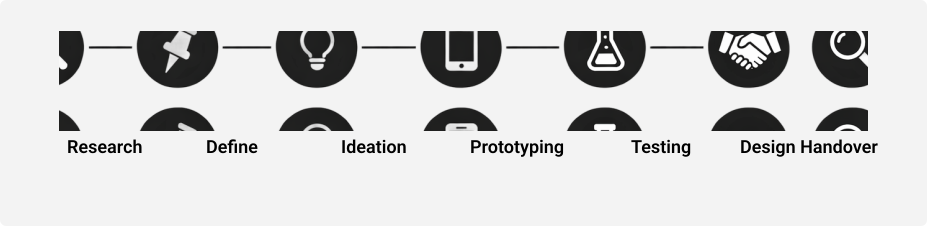
Process Followed
Each stage was designed to build a deep understanding of user needs and iteratively evolve through feedback, ensuring the final solutions seamlessly fit real-world workflows.
03 RESEARCH
User Insights
We conducted Stakeholder and different type of User Interview with families, educators, and potential donors
- Difficulty balancing content for parents and donors
- Risk of overwhelming users with mixed messaging
- Need to communicate impact while staying simple and clear
- Expect transparency in fund usage
- Want to see real stories and impact
- Need trust before contributing
- Lack of structured navigation
- Hard to access age-specific or role-based resources
- Poor content discoverability
- Donation process is confusing
- Too many steps create friction
- Limited transparency on fund utilization
- Complex visuals create sensory overload
04 DEFINE
User Persona
Based on user research insights, we developed 3 personas that represent our key users and highlight their primary needs and pain points.
.jpeg)
Alex Peter
US, 40 Age
Marketing Manager
Alex is a seasoned marketing professional working for an autism training institution. He is passionate about driving awareness, increasing donations, and ensuring the organization's mission reaches the right audience through data-driven and creative strategies.
Pain Points
-
✕Struggles to convert website visitors into donors or program participants
-
✕Limited budget for running large-scale digital campaigns
-
✕Difficulty showcasing the institution's real impact in a compelling way
-
✕Balancing content for both parents and donors without overwhelming either group
-
✕Challenges in optimizing campaigns with limited resources
Goals & Needs
-
✓Drive more traffic and increase engagement on the website
-
✓Improve conversion of visitors into donors (especially recurring donations)
-
✓Clearly communicate impact and build trust with audiences
-
✓Leverage SEO, email marketing, and social media effectively
-
✓Create targeted, meaningful campaigns for the right audience
-
✓Balance storytelling with data to influence decision-making
.jpeg)
Emily Carter
US, 60 Age
Retired Nurse | Volunteer & Donor
Emily is a retired healthcare professional and an active donor who became passionate about autism advocacy after her grandchild's diagnosis. She values transparency, meaningful impact, and staying informed while supporting causes she deeply cares about.
Pain Points
-
✕Lack of transparency in how donations are used and their real impact
-
✕Difficulty navigating complex or unclear donation websites
-
✕Limited access to resources for older children with autism
-
✕Uncertainty about the security and effectiveness of donations
-
✕Overwhelming or poorly structured information on charity platforms
Goals & Needs
-
✓Clearly understand where her donations go and the impact created
-
✓Access reliable information and resources about autism
-
✓Connect with organizations and participate in volunteer activities
-
✓Set up recurring donations or support specific programs easily
-
✓Experience a simple, trustworthy, and transparent donation journey
-
✓Feel confident that her contributions are secure and meaningful

Lisa Thompson
US, 40 Age
Full time Parent
Lisa is a dedicated mother who recently moved to a larger city to find better support for her 7-year-old son with autism. She is actively seeking the right programs and resources but feels overwhelmed by the complexity and variety of available options.
Pain Points
-
✕Difficulty comparing different programs and identifying what suits her child's needs
-
✕Financial constraints make affordability a major concern
-
✕Lack of transparency around pricing and available financial aid
-
✕Trust issues due to past negative experiences with providers
-
✕Overwhelmed by complex information and technical language
Goals & Needs
-
✓Find a trusted institution offering specialized, hands-on autism support
-
✓Access clear and simple information about programs and benefits
-
✓Explore financial aid or scholarship options to make programs affordable
-
✓Gain confidence in the quality and expertise of staff
-
✓Make informed decisions using easy-to-understand content and visuals
-
✓Ensure the best possible support for her child's development
User Journey
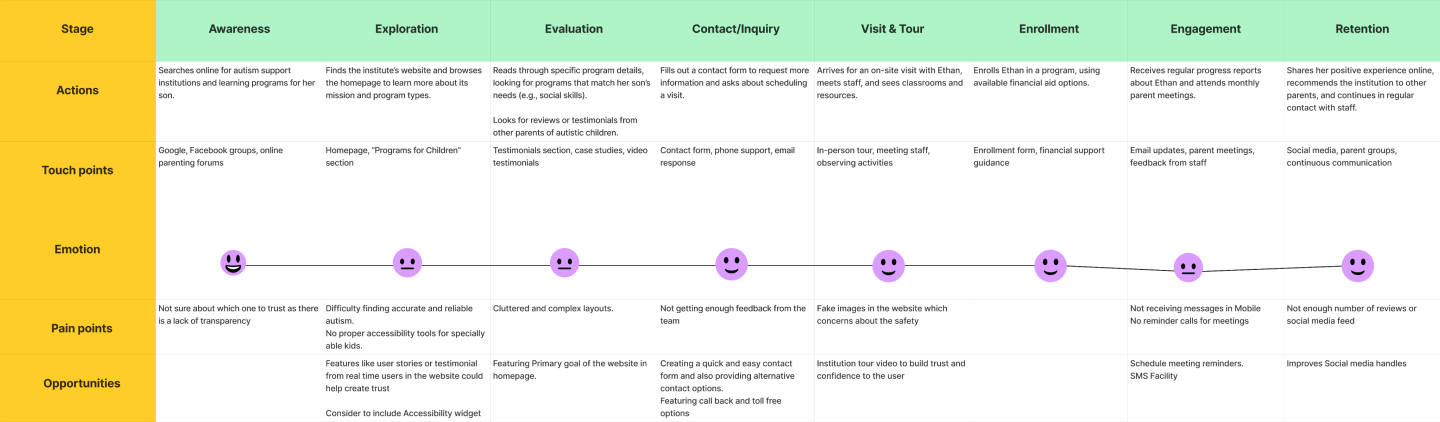
Based on the personas we created a user journey which helps the team to understand and empathize with users.
Scenario
Lisa is a devoted, hardworking mom who recently moved to a larger city to find better support and resources for her son, Ethan, who has been diagnosed with autism. Ethan's needs include social skills development, communication training, and support with sensory processing challenges. Lisa wants to help her son thrive, but she feels overwhelmed by the variety of available programs and unsure which will best suit Ethan's needs. She doesn't have a high income and is concerned about finding an affordable, effective program.
Design Decision
Once we are done with the Journey Mapping we came to the conclusion that each persona experience peaks of satisfaction and connection during specific stages with different challenges. In order to satisfy the user needs we connected again with the Stakeholder with our findings. We created a rough draft on the features to be added as per the research findings.
Key Features & Enhancements
- Landing Page
- Impact Summary
- Clear Calls-to-Action
- Donation Tiers
- Transparent Fund Allocation
- Recurring Donation Option
- Various Services
- Simple Language
- Alternative Text & ARIA Labels
- Accessibility Widget
- Email Notifications
- Reviews and Testimonials
Site Map
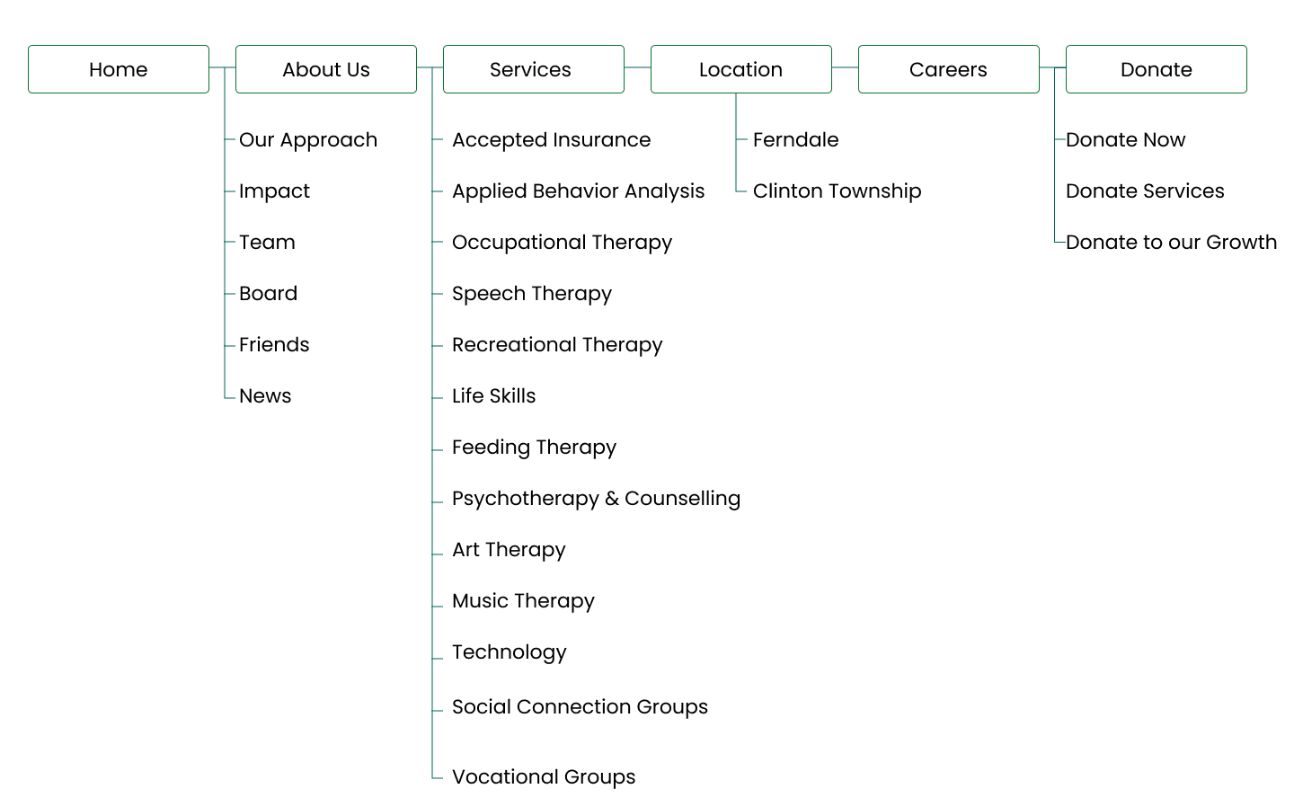
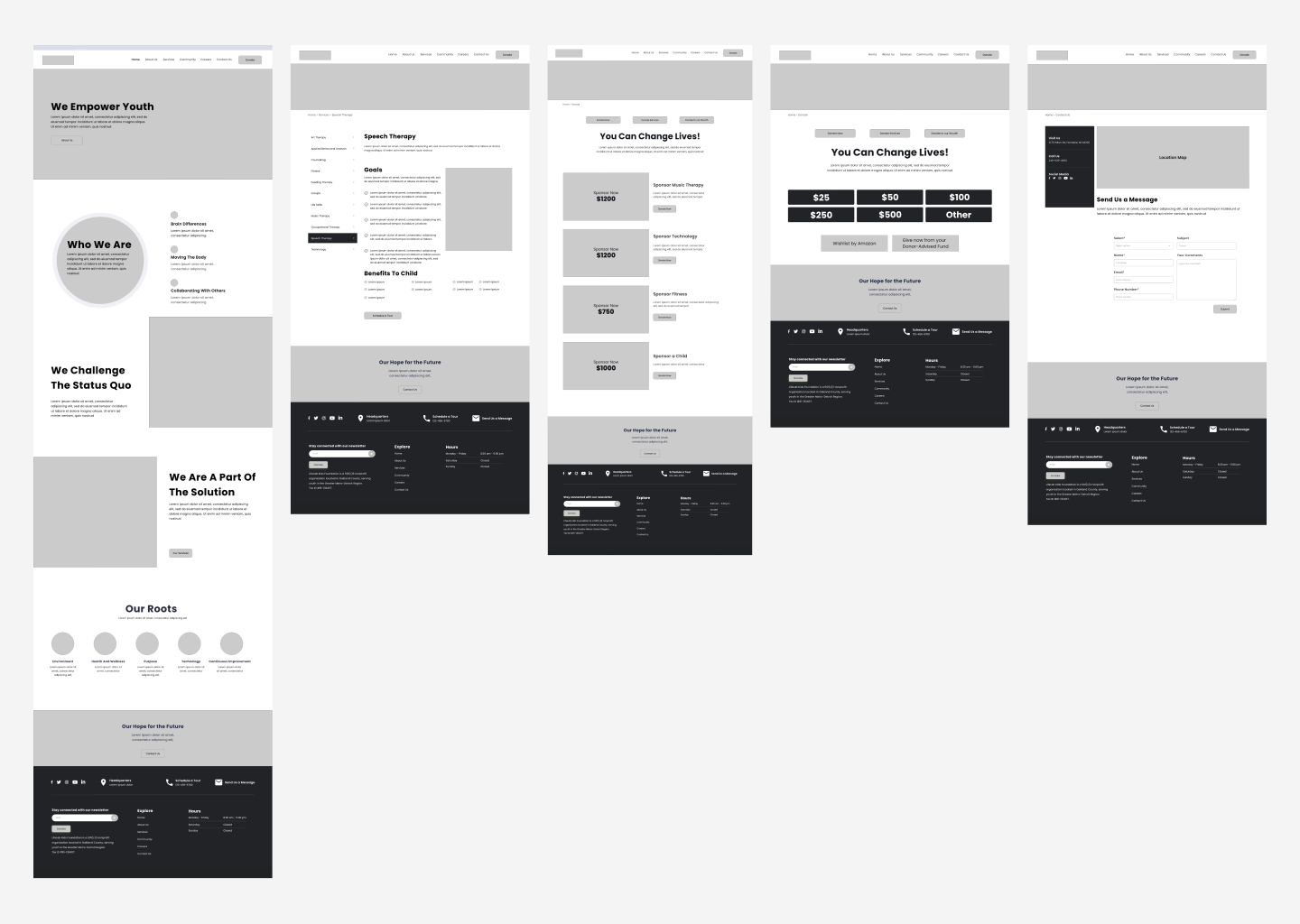
We decided to create the sitemap with the decision discussions we have and will be followed by a wireframe mockup based on the user research, stakeholder and marketing team inputs we create wire frames with the initial copy received from the copy team.
05 IDEATE
Wireframe
06 DESIGN
Style Guide
.svg)
Visual Design
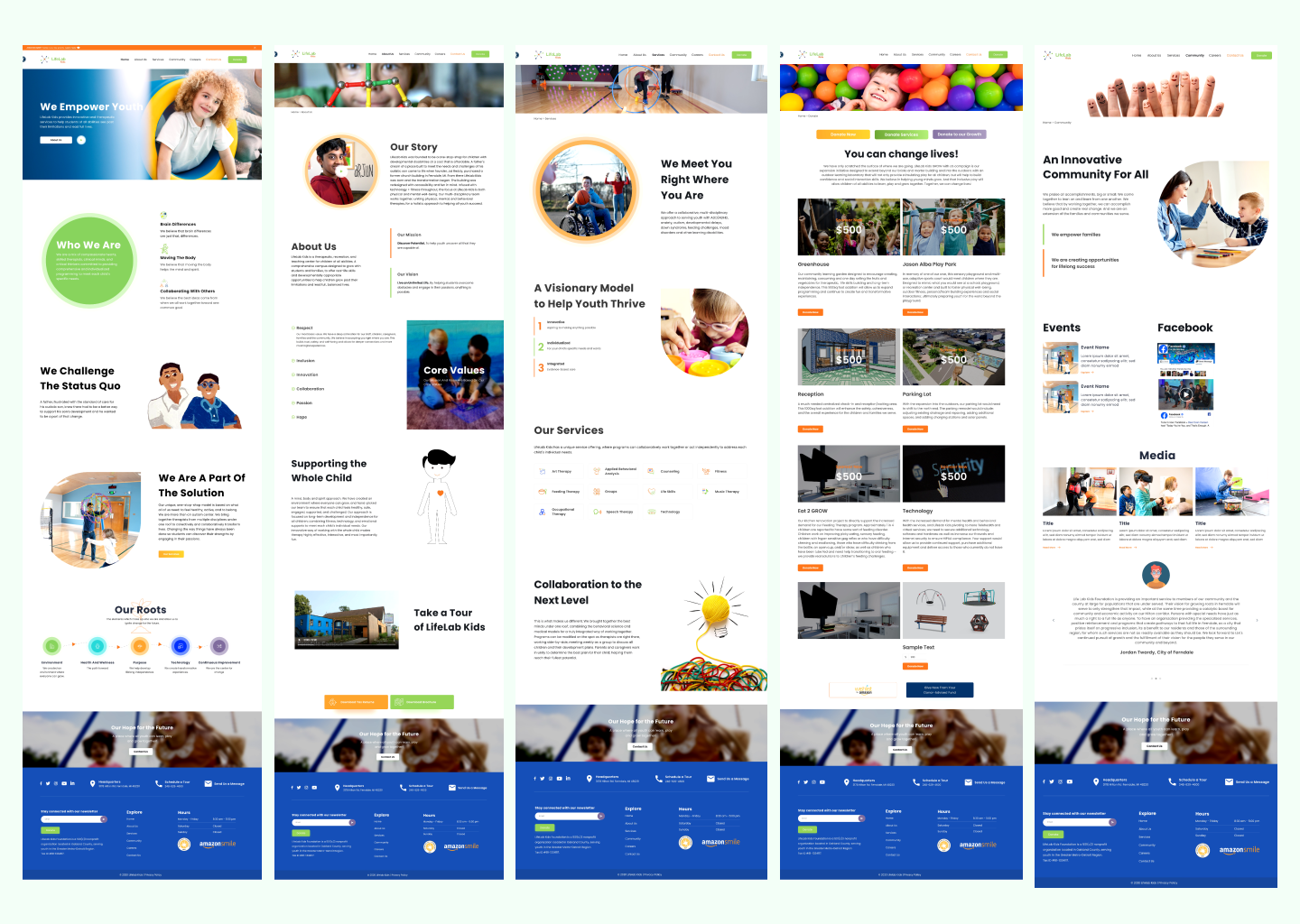
Mobile Design
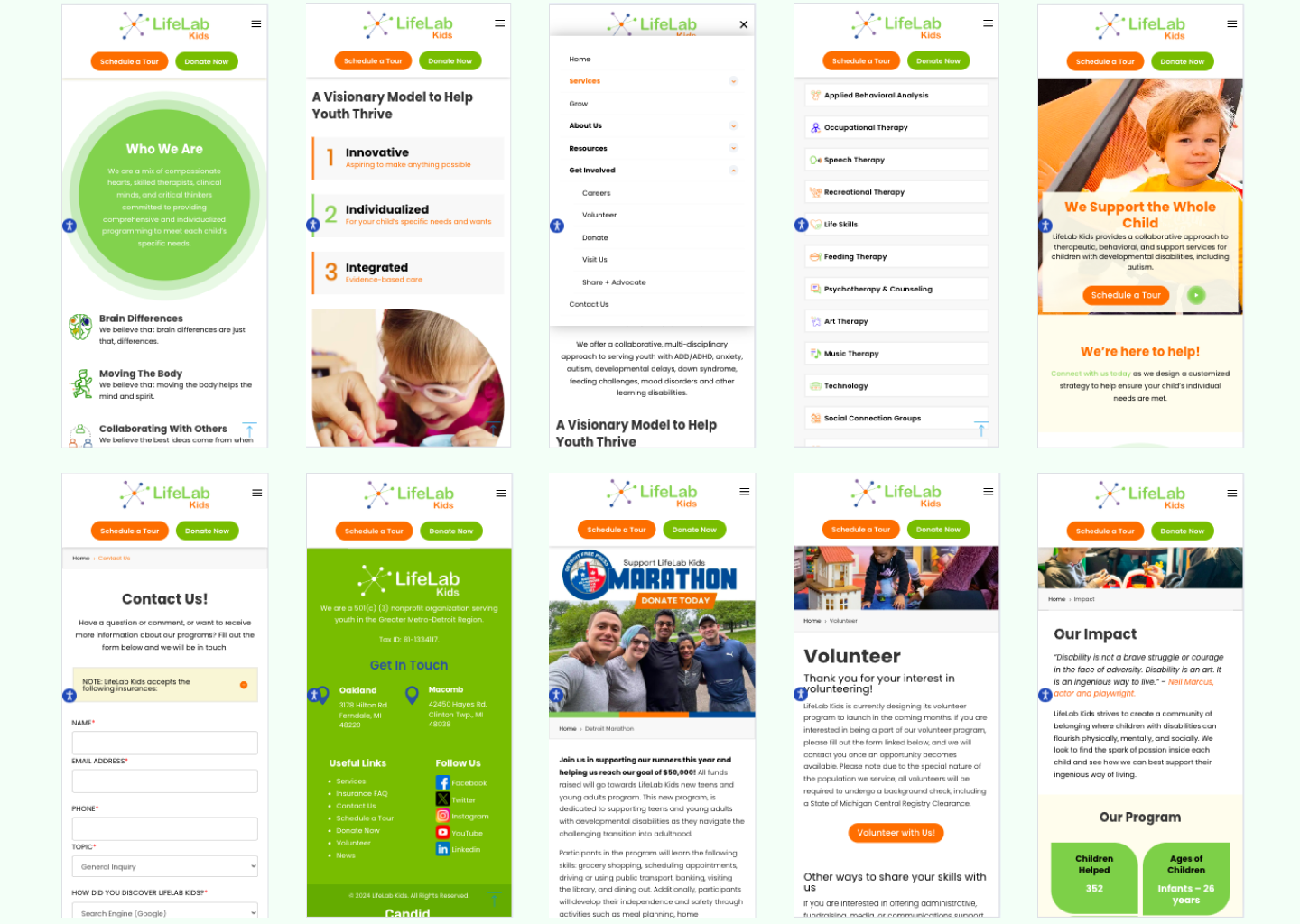
07 PROTOTYPE
Interactive Prototype
08 USABILITY TESTING
Test and Iterate
We conducted moderated usability testing with a sample size of six participants to deeply understand how users interact with the system in real-world scenarios. Each session was facilitated, where users were guided through key tasks such as navigation, donation flows, and accessibility features.
What worked
Ease of Navigation: Evaluate how easily families, educators, and donors can find relevant sections.
Donation Flow: Ensure the donation process is simple, clear, and builds trust.
Accessibility for Users: Assess the effectiveness of sensory-friendly and accessibility features.
Positive Navigation Experience: Users found the modal navigation intuitive and could locate content easily.
Increased Trust in Donations: Transparency elements improved user confidence by 30%.
What didn't work
Accessibility Gaps: Users faced challenges with color contrast and visual cues.
Recommendations
Enhanced Accessibility: Integrated a third-party accessibility widget, improving usability and receiving positive feedback from both users and the marketing team.